What Is HyperEVM? HyperCore vs HyperEVM, Wallet Setup and Transfers
HyperEVM is the smart-contract side of the Hyperliquid blockchain. HyperCore runs the exchange; HyperEVM runs Ethereum-style apps (lending, DEXs, liquid staking) with HYPE as gas. Same 0x address, separate balances. Chain ID 999, RPC https://rpc.hyperliquid.xyz/evm.
Moving HYPE or USDC across (Transfer to/from EVM in the app) starts from a funded Hyperliquid account. No account yet? Join with code HOLYGRAIL first.
The code takes 4% off your trading fees on the first $25M of volume, including the HYPE you buy for gas, and can only be added before $10,000 of volume. We earn a commission when you sign up through our links; it never raises your fees.
By Cipher Intelligence Editorial Team · Published · 8 min read · Checked against the Hyperliquid docs, the app's English interface and the HyperEVM JSON-RPC on October 22, 2026 · How we verify
What is HyperEVM?
The Hyperliquid blockchain has two parts. HyperCore is the exchange you trade on: perpetual and spot order books, margin, liquidations, HYPE staking and vaults, all built into the chain itself. HyperEVM is an Ethereum Virtual Machine added to the same chain, so developers can deploy ordinary Solidity contracts with ordinary EVM tools. Hyperliquid's docs are explicit that it "is not a separate chain, but rather, secured by the same HyperBFT consensus as HyperCore".
That shared state is the point of the design. A HyperEVM contract can read HyperCore data such as oracle prices, positions and balances through read precompiles (addresses from 0x…0800), and send actions such as orders, transfers or staking to HyperCore through the CoreWriter system contract at 0x3333…3333 (about 47,000 gas for a basic call). The docs' example is a lending protocol that reads collateral prices straight from the order books and liquidates borrowers by trading on them. A token can also live on both sides: its HyperCore spot asset is linked to an ERC-20 contract, so the same token trades on the order book and works in HyperEVM apps.
The docs still call HyperEVM "in the alpha stage", with throughput being raised gradually; gas can spike when demand outruns the deliberately small blocks.
HyperCore vs HyperEVM: the differences
HyperCore
HyperEVM
What it is
The exchange engine: order books, perps, spot, margin, liquidations, staking, vaults
A general-purpose EVM for smart contracts (Cancun, without blobs)
Gas
None for trading actions
HYPE, with EIP-1559 base and priority fees (both burned)
Blocks
The Hyperliquid L1 block
Small blocks every 1 s (3,000,000 gas), big blocks every 60 s (30,000,000 gas)
Your balance shows in
The Hyperliquid app (Balances, Portfolio)
Your wallet extension, once the network is added
How you talk to it
The Hyperliquid app or API (signed actions)
JSON-RPC (https://rpc.hyperliquid.xyz/evm) and any EVM wallet or tool
Explorer
The app explorer or HypurrScan
HyperEVMScan (hyperevmscan.io) and Hyperscan (hyperscan.com)
From the Hyperliquid docs (HyperEVM, dual-block architecture, onboarding FAQ), read October 22, 2026.
One address, two balances is the part that trips people up. If you log in with a wallet, its 0x address is your account on both sides, but HyperCore balances only appear in the Hyperliquid app and HyperEVM balances only appear in a wallet or HyperEVM explorer. A trader who never touches HyperEVM can ignore it completely; perps, spot and deposits all happen on HyperCore. Which wallets handle both sides well: best wallet for Hyperliquid.
Hyperliquid's onboarding page gives these values for "Add Custom Network" (read October 22, 2026; the official RPC answered chain ID 0x3e7 = 999 the same morning):
Network name
Hyperliquid
Chain ID
999 (hex 0x3e7)
RPC URL
https://rpc.hyperliquid.xyz/evm
Currency symbol
HYPE
Block explorer (optional)
HyperEVMScan (hyperevmscan.io) and Hyperscan (hyperscan.com)
MetaMask (or any EVM wallet): open the network menu, add a custom network (the docs call the button "Add Custom Network"), paste the values above and save. The docs also link Chainlist's page for chain 999 as a one-click alternative; check that the RPC it adds is the one above.
Rabby: the support FAQ says Rabby "supports the HyperEVM as an integrated network", so there is no custom network to type, and it recommends Rabby when another wallet will not accept the network.
Show a token: on a spot pair's Trade page, the wallet icon next to Contract adds that token to your wallet ("Add this token to the HyperEVM network in your wallet extension"). You can also paste the contract address from a HyperEVM explorer.
Two known errors. "Invalid transaction envelope type: specified type 0x2 but included a gasPrice…" is, per the support FAQ, a known MetaMask issue; switch to Rabby. A warning that you have "insufficient ETH" for gas means the network was added wrongly: HyperEVM gas is HYPE, never ETH. For a multisig, the docs list Safe, Den and Palmera as Safe instances on HyperEVM.
How to move HYPE and USDC between HyperCore and HyperEVM
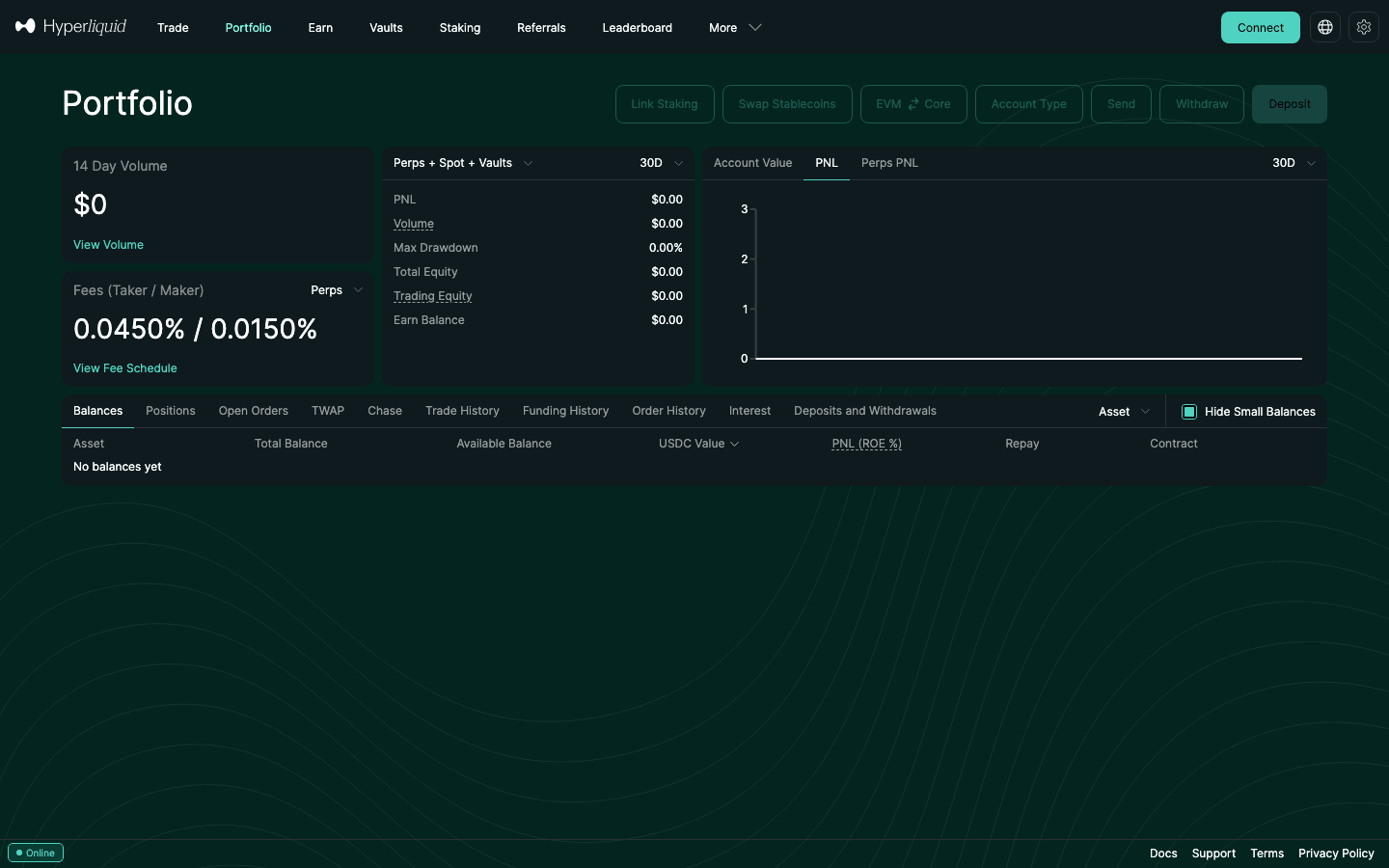
The Portfolio page on October 22, 2026 (logged out, so the buttons are greyed): EVM ⇄ Core opens the EVM Transfer window. The Balances table also has a Transfer to/from EVM action once you hold a token.
Open the EVM Transfer window:Transfer to/from EVM in the Balances table (Trade or Portfolio page) or EVM ⇄ Core at the top of the Portfolio page. The app describes it as "Transfer assets between your HyperEVM and HyperCore Spot balances." In our reading of the app it is active on the master account, not on sub-accounts.
Pick the direction with the Spot ⇄ EVM switch and choose the token. Only spot balances move: in a Manual (standard) account, move USDC from Perps to Spot first; in the default Unified account it is one balance already.
Check the fee line and confirm. Going to the EVM, the window shows "A fee of ~… HYPE will be charged to receive [token] on the EVM". The docs price it at 200,000 gas at the next block's base fee, paid in HYPE from your HyperCore spot balance: at the 0.1 gwei base fee we read on October 22, 2026, about 0.00002 HYPE (≈ $0.0016 at that day's HYPE price). Coming back, you sign an EVM transaction and pay normal HyperEVM gas; for USDC the app asks for two confirmations, "Approve USDC for transfer" and "Transfer USDC to HyperCore".
Timing: a HyperCore → HyperEVM transfer waits for the next HyperEVM block (small blocks come every 1 s); HyperEVM → HyperCore is processed in the same L1 block as the EVM block that carries it.
The 0x2222 address is for HYPE only. Sending HYPE to 0x2222222222222222222222222222222222222222 moves it across in either direction. Every other token has its own system address (0x20 followed by its token index), and the docs warn that other assets sent to the HYPE address are lost. Use the app's window instead of typing addresses.
Exchanges: some exchanges send and receive HYPE on HyperCore but not on HyperEVM. Check which side your exchange supports and send a small test first.
Clicked it by accident? Nothing is lost. The support FAQ: the funds "went from HyperCore to the HyperEVM"; move them back with the same button, after putting a little HYPE on the EVM for gas.
Bridging into HyperEVM from Ethereum, Arbitrum or Base without touching HyperCore is a different job, with routes compared in the Hyperliquid bridge guide. Depositing to trade lands on HyperCore: Hyperliquid deposit guide.
The Transfer to/from EVM button only works for a funded Hyperliquid account. Open one with code HOLYGRAIL (deposit at least 5 USDC), then buy a little HYPE on spot for gas.
The docs give two ways. The direct one: buy HYPE with USDC on the HYPE/USDC spot market on Hyperliquid (0.070% taker / 0.040% maker at the base tier) and send it with Transfer to/from EVM. The second: a bridge or gas service from another chain; the onboarding page names Stargate, deBridge, Gas.zip and Jumper, among others. A few cents' worth of HYPE covers many transactions at normal gas prices, but keep a buffer, because the base fee rises when blocks are full. Testnet HYPE for practice comes from faucets, not from the exchange (HyperEVM testnet faucet, chain ID 998). What else HYPE is used for: HYPE token guide.
What can you do on HyperEVM?
Hyperliquid points users to community directories (ASXN, HypurrCo, HL Eco) rather than endorsing apps. To show what the activity looks like, here are the largest HyperEVM apps in four categories by DefiLlama's TVL on October 22, 2026. This is a description of usage, not a recommendation; each app is a separate team with its own contracts and risks.
Category
Examples
TVL (DefiLlama, October 22, 2026)
What you do there
Liquid staking
Kinetiq (kHYPE), stHYPE
$855.6M, $178.3M
Stake HYPE and get a token that keeps earning while you use it elsewhere
Lending
HyperLend, Morpho
$323.8M, $137.3M
Supply tokens for interest or borrow against them
DEXs (AMMs)
Project X, HyperSwap
$36.1M, $10.6M
Swap ERC-20 tokens or provide liquidity
Stablecoin (CDP)
Felix
$25.3M
Mint a stablecoin against deposited collateral
DefiLlama protocol data, value counted on its "Hyperliquid L1" chain. Morpho also runs on other chains; only its Hyperliquid L1 value is shown.
Liquid staking is the largest of these categories. Native HYPE staking on HyperCore has an unstaking queue of 7 days, while a liquid-staking token keeps the staking reward and stays usable, for example as lending collateral. How native staking itself works: Hyperliquid staking. Yield options across DEXs: DEX passive income. The wider map, with Hyperliquid's own app directory, trading front ends and ecosystem tokens: Hyperliquid ecosystem.
Is HyperEVM safe? Risks to know
App risk is yours. Hyperliquid runs the chain, not the apps on it. A bug or exploit in a lending pool or DEX contract can lose the funds in it, whatever the chain does.
Linked tokens need checking. The docs warn that there are "no checks that the system address has sufficient supply or that the contract is a valid ERC20" and that a linked contract "may have arbitrary bytecode". Verify a token's contract before moving a large amount across; the app shows the same warning when you transfer.
Wrong network, wrong side. HyperCore and HyperEVM share an address, so a transfer to the right address on the wrong side is common and confusing, though recoverable. A token sent to the wrong system address is not.
Early-stage throughput. The HyperEVM launched with deliberately low capacity; gas spikes during busy periods are expected.
Phishing. Add the network from the docs' values or Chainlist, never from a link in a direct message, and check every approval your wallet asks you to sign.
HyperEVM RPC and limits for developers
Official RPC:https://rpc.hyperliquid.xyz/evm (testnet: chain ID 998). No websocket JSON-RPC on it, at most 100 requests a minute, only the latest block for state calls, and eth_getLogs limited to 4 topics and 50 blocks per query. For archive data and higher limits, the docs list third-party RPCs (Alchemy, QuickNode, Chainstack, dRPC and others).
EVM version: Cancun without blobs; EIP-1559 is on, and both base and priority fees are burned. HYPE has 18 decimals on the HyperEVM; wrapped HYPE (WHYPE) is a system contract at 0x5555…5555.
Big blocks: contracts too large for a small block (3,000,000 gas) are deployed by setting usingBigBlocks with the evmUserModify action (30,000,000 gas, one a minute); eth_bigBlockGasPrice quotes their fee.
Talking to HyperCore: read precompiles and CoreWriter as above; order actions and vault transfers sent from CoreWriter are delayed on-chain by a few seconds. Trading through the native API instead: Hyperliquid API guide.
FAQ
What is HyperEVM?
HyperEVM is the Ethereum-compatible smart-contract part of the Hyperliquid blockchain. It runs the same EVM as Ethereum (the Cancun version, without blobs), uses HYPE as its gas token and has chain ID 999. It is not a separate chain: it shares HyperBFT consensus and state with HyperCore, the part that runs Hyperliquid's order books, so contracts on HyperEVM can read HyperCore prices and send orders to it.
What is the difference between HyperCore and HyperEVM?
HyperCore is the exchange: order books, perps, spot trading, margin and staking, with no gas for trading. HyperEVM is a general smart-contract environment for apps such as lending markets, DEXs and liquid-staking tokens, where every transaction costs gas in HYPE. Your 0x address is the same on both, but each side has its own balances, and you move tokens between them with Transfer to/from EVM.
How do I add HyperEVM to MetaMask?
In MetaMask choose Add a custom network and enter Network name Hyperliquid, RPC URL https://rpc.hyperliquid.xyz/evm, Chain ID 999 and currency symbol HYPE (a block explorer is optional), or add chain 999 from chainlist.org. Hyperliquid's support FAQ notes a known MetaMask error with HyperEVM transactions and suggests Rabby, which lists HyperEVM as a built-in network.
Is HyperEVM a separate blockchain?
No. The docs describe the Hyperliquid blockchain as one state with two parts, HyperCore and HyperEVM, both secured by the same HyperBFT consensus. That is why moving a linked token between them is a transfer inside one chain, not a bridge.
Why did my funds disappear after Transfer to/from EVM?
They moved from your HyperCore spot balance to the HyperEVM side of the same address, which the Hyperliquid app does not show as trading balance. They are not lost. Add the HyperEVM network to your wallet to see them, and move them back with the same button; that direction needs a little HYPE on the HyperEVM for gas.
Do I need HYPE for gas on HyperEVM?
Yes. HYPE is the only gas token. Moving tokens from HyperCore to HyperEVM is paid in HYPE from your HyperCore spot balance (200,000 gas at the next block's base fee, about 0.00002 HYPE on October 22, 2026); every HyperEVM transaction, including the transfer back, is paid in HYPE on the HyperEVM. You can buy HYPE on Hyperliquid spot and transfer it over.
Start on HyperCore, then move to HyperEVM
Every route onto HyperEVM through the Hyperliquid app starts with a funded Hyperliquid account. Join with code HOLYGRAIL: 4% off trading fees on your first $25M of volume, applied automatically when you join through the link.
Disclosure: HOLYGRAIL is our referral code; we earn a share of referred accounts' fees at no cost to you. Network values, transfer rules and limits are from the Hyperliquid docs and app read on October 22, 2026; the gas price and HYPE price are single readings from that day; TVL figures are DefiLlama's. Apps named here are examples, not endorsements. Not investment advice.